Local-first desktop Β· free Markdown tools Β· AI memory

No preview button. What you see is the finished page.

The local-first Markdown editor and AI knowledge base.

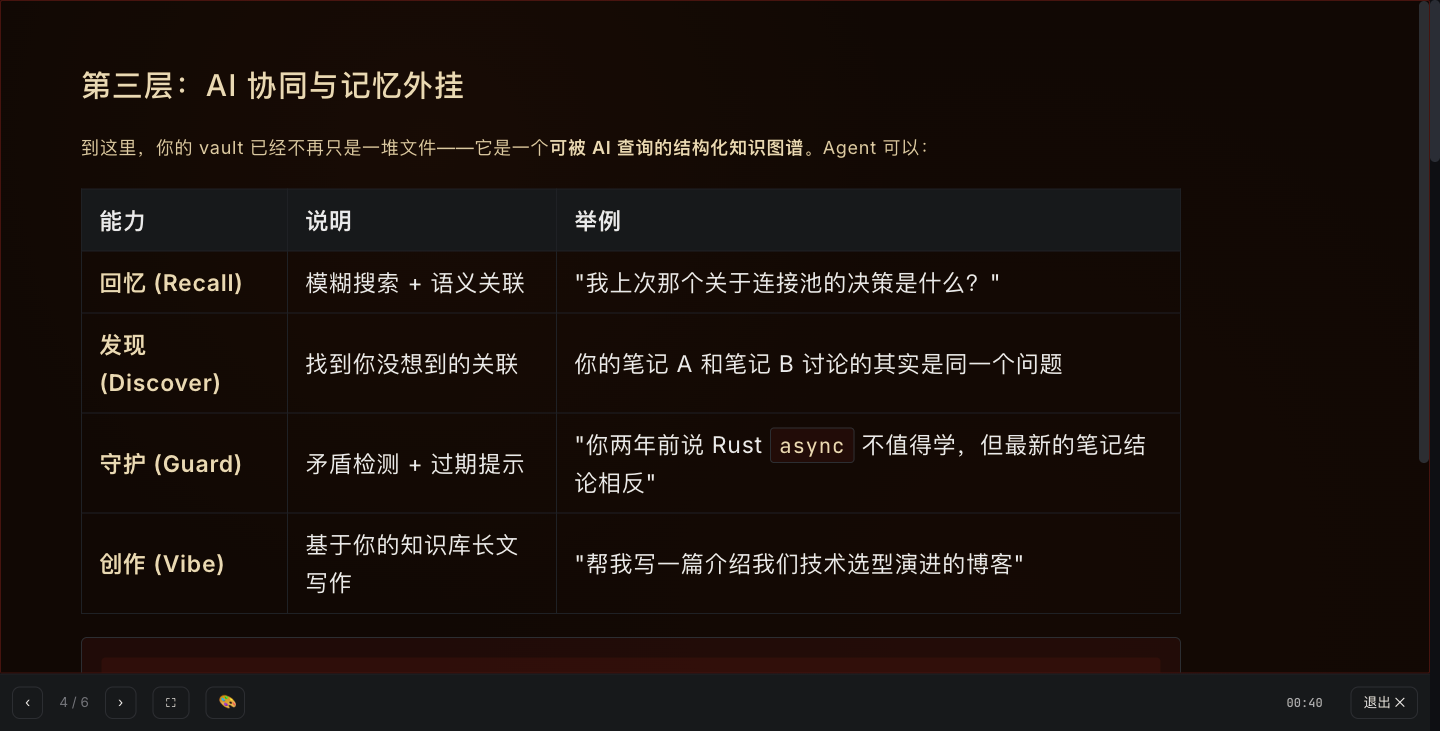
Open your existing Markdown folders without importing or migrating. Download the desktop or iOS app when you need it, or start with the free browser Markdown tools β€” preview, edit, convert, export, tables, TOC, formatter, web capture.

See everything it can do β†’

Local-firstsource files stay .mdfree Markdown toolsAgent skillMCPTypora alternativeZettlr alternativeBear alternative

macOS Β· Windows Β· Linux Β· iPhone & iPad Β· files stay on your machine

roadmap.md
---
marp: true
---
# Q3 Product Roadmap
Write once β†’ present, export, share.

The actual desktop client

Open a vault β€” every folder, every agent, every note.

The same .md files on your disk that you write today, plus first-class folders for the AI tools that read them. MDDock is the local vault that Claude Code, Cursor, Codex, and your own agents all share.
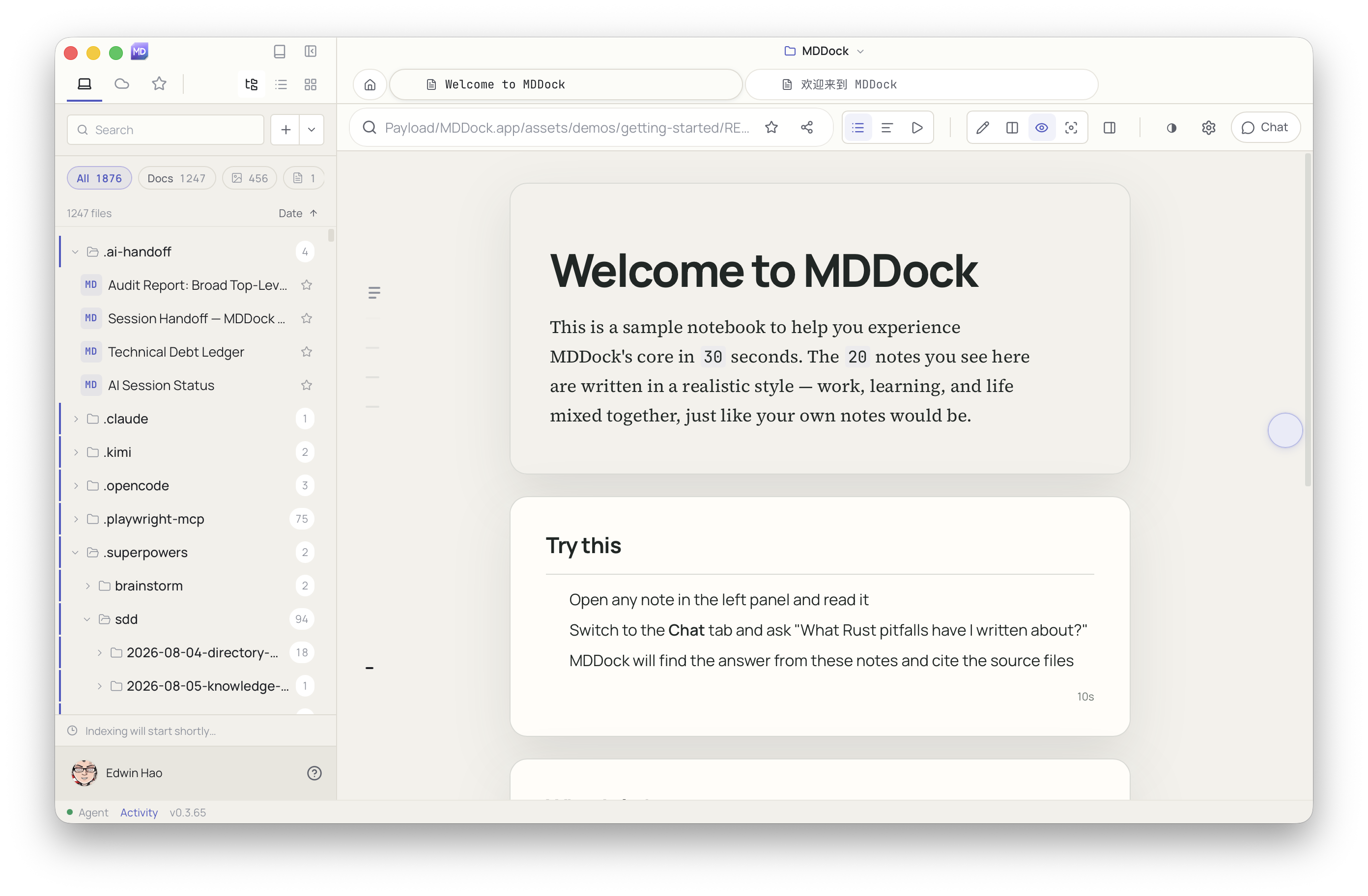
MDDock desktop client on macOS, v0.3.65. A 'Welcome to MDDock' sample notebook is rendered in the editor β€” a 30-second tour of 20 sample notes written in realistic style. The left file tree shows the vault root with agent folders visible: .ai-handoff, .claude, .kimi, .opencode, .playwright-mcp, .superpowers, and .sdd β€” proving that MDDock is the local home for both human-written Markdown and AI agent state. The status bar at the bottom shows v0.3.65.
Real capture Β· v0.3.65 desktop build Β· macOS

Every folder on the left is a plain directory on your disk β€” .claude / .kimi / .opencode / .sdd are agent state, not proprietary databases. MDDock reads them all. The Welcome notebook is the 30-second tour you get on first launch.

v0.3.65

How it works

Any document β†’ Markdown β†’ any output

MDDock turns your files into searchable, linkable, version-controlled plain text first. Then it works for you.

Import anything

Word, PDF, PowerPoint, Excel, EPUB, web pages β†’ clean Markdown, with metadata preserved in frontmatter.

Markdown is the source

Your files are no longer binary black boxes. Every note is plain text you can search, link, and sync with git or Dropbox.

Export anywhere

The same .md files become Office documents, Marp slides, web pages, or PDF, only when humans need familiar formats.

AI can actually read it

LLMs answer from your Markdown notes, cite your past judgments, and write drafts that stay in your vault.

No install required

Free Markdown tools in the browser

Preview, edit, convert, export, tables, TOC, formatter, web capture β€” files never leave your device. Use our free Markdown editor, Markdown preview, Markdown to PDF converter, Markdown formatter, and more. When you want the full office suite and memory, install the desktop app.

πŸ“–

Markdown preview

Paste Markdown, pick a way to read it, document, card flow, or presentation.

  • β–ΈThree viewing modes: document / cards / presentation
  • β–ΈSupports Mermaid, MathJax, plantuml
  • β–ΈDark / light theme toggle
Open β†’
✍️

Immersive editor

Distraction-free writing, serif body, live preview. Saved in your browser, no account.

  • β–ΈCodeMirror 6 core with syntax highlighting
  • β–ΈReal-time preview, WYSIWYG
  • β–ΈFull keyboard shortcuts, clean source export
Open β†’
πŸ“₯

File to Markdown

PDF / Word / HTML β†’ clean Markdown. Files never leave your browser. Share as a URL any AI agent can read.

  • β–ΈPDF / Word / HTML / EPUB support
  • β–ΈGenerate Agent-ready links
  • β–ΈPrivacy-first: files never uploaded
Open β†’
πŸ“€

Markdown export

Turn Markdown into a PDF, Marp slides, or clean embeddable HTML.

  • β–ΈPDF / DOCX / PPTX / HTML export
  • β–ΈMarp slides export
  • β–ΈBatch export support
Open β†’
πŸ“Š

Online Spreadsheet Calculator, Free Formula & CSV to Markdown

Free online spreadsheet with formulas. Calculate SUM, AVERAGE, IF. Convert CSV to Markdown tables. Runs in your browser, no sign-up.

  • β–ΈFormula support: SUM / AVERAGE / IF
  • β–ΈCSV import/export
  • β–ΈGenerate Markdown table syntax
Open β†’
πŸ”—

TOC generator

Auto-build an anchored table of contents from your headings.

  • β–ΈNested / flat / numbered styles
  • β–ΈAutomatic anchor links
  • β–ΈOne-click copy to clipboard
Open β†’
🧹

Formatter

Normalise heading levels, list markers and blank lines.

  • β–ΈAuto-correct heading levels
  • β–ΈUnify list markers
  • β–ΈNormalize blank lines, trailing whitespace
Open β†’
πŸ“Œ

Save the web to MDDock

Turn any web page into a Markdown note in your local vault with one click.

  • β–ΈBookmarklet + deep-link capture
  • β–ΈPage converted locally; nothing sent to the cloud
  • β–ΈSaved to inbox/captured/ in your vault
Open β†’

Vibe Work

Prompt to document in seconds

Type what you need, MDDock generates a full Markdown document, then exports to any format.

Learn more β†’

You type

Office round-trip

Word ↔ Markdown β€” titles, tables, and structure preserved

Import a .docx, edit in Markdown, export back to Word, formatting, tables, and images stay intact.

Learn more β†’

πŸ“„
.docx
.md
Markdown
πŸ“Š
.pptx / .xlsx

Why MDDock

Office workflows, without losing the source.

The desktop app is the product. Browser tools below are a free taste, nothing uploaded.

Markdown office suite

Three dialects in one vault: letters, pipe-table sheets, and Marp decks. Disk always holds .md; Word, Excel, and PowerPoint are exports, not the source of truth.

  • βœ“Import .docx / .pptx / .xlsx β†’ clean markdown with provenance in frontmatter
  • βœ“Export back to Office when humans need familiar formats
  • βœ“Scenario wizards (meeting, PRD, blog, retro) start structured drafts in seconds
  • βœ“Agents edit text your recall index can search, not opaque cloud docs

Learn more β†’

πŸ“„
report.docx
Convert
.md
report.md
Export
πŸ“Š PPTXπŸ“ˆ XLSXπŸ“‘ PDF

Memory that grows with you

Every person, project, and idea you mention in a note gets automatically remembered. Next time you write, the β€œmaybe related” sidebar pulls up older passages automatically. When you chat with AI, it cites not generic knowledge but the half-finished judgment you wrote three weeks ago. Your vault is its long-term memory, keep writing, and it grows on its own.

  • βœ“Hybrid recall (keyword + meaning) across every note in the workspace
  • βœ“Passive β€œmaybe related” hints in the editor, dismissable, never blocking
  • βœ“Chat suggests first questions from your recent notes
  • βœ“Save answers back into the vault β†’ the next round gets smarter

Learn more β†’

current-note.md
Meeting Notes
Discussed Q3 roadmap with team.
Need to revisit budget allocation.
Maybe Related
Meeting with Zhang San about Q3 roadmap
Budget concerns for office round-trip
Timeline: July - September

Capture anything

PDFs, Office files, EPUB, web pages, and more land as Markdown under imports/, ready for search, linking, and agent context.

  • βœ“11 import formats via pure-Rust pipelines on desktop
  • βœ“Preview path and fidelity before you commit the save
  • βœ“After import: related notes, tags, and a one-click draft outline
  • βœ“Scanned PDFs get a clear OCR hint, no silent empty files
πŸ“
Drop files here
.docx, .pdf, .pptx, .xlsx

Real moments

Memory in motion

Not abstract features, three moments from your everyday writing.

Moment 1 Β· Writing
Mention a familiar name, and older judgments resurface
# 6/19 Meeting retroΒ Spent the afternoon with Zhang San reviewing the Q3 Roadmap.He had a different take on priorities,will write it up separately.
Product meaning: people and topics you keep coming back to surface their past notes.
Moment 2 Β· Chat
β€œWhat was that decision from before?”
What was that roadmap decision from before?
Two things settled at the 5/28 meeting: office round-trip before memory v2, and the eval harness pushed to Q4.
πŸ“ŽFrom 5/28 Β· Meeting notes β€Ί Roadmap decision
Product meaning: AI no longer leans on generic knowledge, it cites what you wrote.
Moment 3 Β· Linking
People and projects in one report link back to four older notes
This week Β· Personal weekly
Key events:Continued Zhang San on Q3 Roadmap,some friction around office round-trip priority;next week sync Li Si on eval harness.
Product meaning: people and projects you mention repeatedly auto-link back to every page that names them.

From Markdown to anything

One source, many uses

Write once in Markdown, then turn it into whatever the moment needs.

Office document

DOCX / XLSX / PPTX

Slides

Marp deck

AI context

Paste into any LLM

Web page

Publish and share

How it works

From your existing folder to sourced answers.

Open the folder you already use, keep working; connect when you need help, then return to the source files to verify.

01

Open your existing folder

Pick the Markdown folder you already use. No import into a proprietary knowledge base.

02

Keep doing daily work

Read, edit, organize, and search around your original .md files.

03

Connect AI when needed

Ask inside MDDock, or let supported tools retrieve your workspace via CLI, terminal TUI, or MCP.

04

Check sources, return to the original

Verify results against matching files and paths, then open the original to keep working.

Open your existing folder
report.mdmeeting-notes.mdroadmap.md
No migration to a proprietary formatLocal work needs no login firstAI on demand

Markdown-first

Get everyday Markdown work done first.

Without connecting AI, read, edit, organize, and search Markdown the way you already know.

Learn more β†’

~/notes/long-document.md
$ cat long-document.md
# Long documents are easy to navigate
Switch between document and card-stream views to match the content.
---
β€’ Document view: Focus on one long piece, in any of 13 reading themes.
β€’ Card stream: Skim by section quickly.
β€’ Presenter mode: Use Markdown for presentations.

Long documents are easy to navigate

Switch between document and card-stream views to match the content.

Markdown-first

What you can do in this mode

Document view

Focus on one long piece, in any of 13 reading themes.

Card stream

Skim by section quickly.

Presenter mode

Use Markdown for presentations.

Terminal interface

Browse, edit and recall Markdown in the terminal.

Run `mddock` to launch the interactive TUI without opening a desktop window. Use the keyboard to browse the file tree, edit content, open the Slash menu to insert formatting, or run `mddock recall` to search the current workspace.

  • βœ“Run `mddock` to launch the terminal interface
  • βœ“Browse Markdown and previewable files in a tree
  • βœ“Built-in editor with `/` Slash menu
  • βœ“`mddock recall` returns verifiable sources in the terminal
~/notes
$ mddock
Open the Markdown workspace in the current directory
> user-interview-summary.md
> core-positioning.md
$ i
Enter editor, type / to open the Slash menu
$ :recall launch scope
Command palette search returns verifiable sources
Press ? for shortcuts Β· Press q to quit
πŸ’»

Local vault

TLS
☁️

MDDock Cloud

real-time
πŸ‘₯

Team

Cloud

Local-first, team-ready

Your files stay on your machine by default. When you want to collaborate, MDDock Cloud gives you sync, shared Cloud Docs, real-time co-editing, version history, and agent tokens, without exposing your local vault.

  • βœ“Your local vault stays on your device by default
  • βœ“Shared Cloud Doc spaces with collaborators
  • βœ“Real-time co-editing + version history
  • βœ“Sign in with GitHub or Google

Agent skill

Agents work in your vault, not against it

Install MDDock skills for Claude Code, Cursor, and Codex so your agents read skills, rules, and memory via CLI, TUI, or MCP. Local hybrid recall gives agents context, and every change stays in your vault.

  • βœ“One-click Agent skill install for Claude Code, Cursor, and Codex
  • βœ“Skill-first integration: agents read your Markdown skills
  • βœ“Local hybrid recall gives agents context from your notes
  • βœ“Full audit trail of human, IDE, and agent edits
Agent online
Agent tool loop
# Agent tool loop
recall("Q3 roadmap decision")
read("2026-05-28-meeting.md")
remember("office-roundtrip before memory-v2")
propose("draft Q3 update based on past judgment")
# Saved to vault by agent Β· attributed

Real product screenshots

This is what the desktop app actually looks like.

Four real captures from the v0.3.x desktop build β€” not wireframes, not mockups.

MDDock Letterpress reading theme: serif body, code fence with monospace rule line, and a linked table at the bottom.
Letterpress reading theme

Switch the look for long-form reading: Letterpress / Newsprint / Paperback / Stage / Mono.

MDDock Present mode rendering a Markdown document as a centered Marp-style slide.
Present mode

Same Markdown, switched to a Marp-style slide deck in one click.
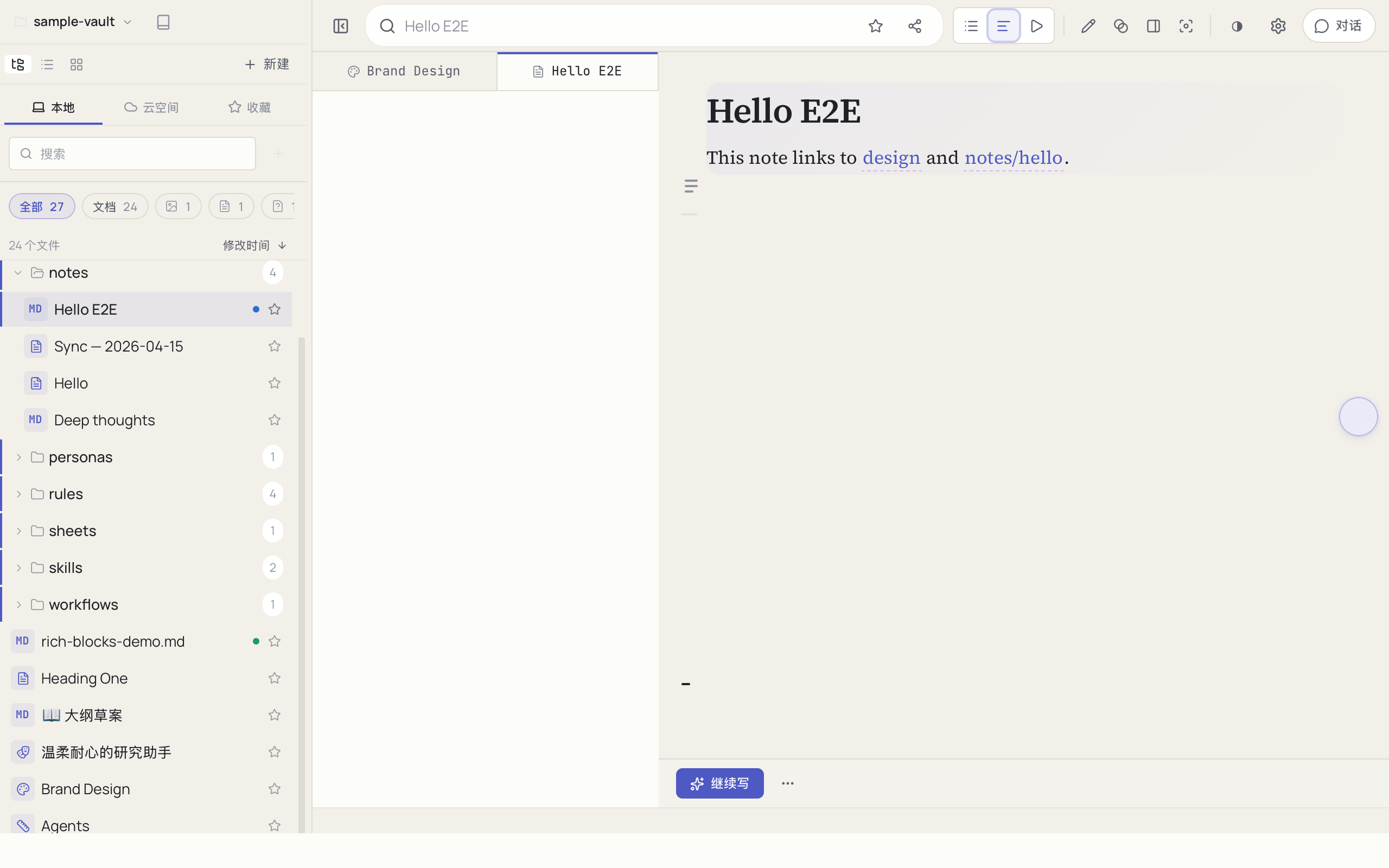
MDDock desktop client on macOS showing a Markdown file rendered in the Reader reading template β€” single-column prose, with the side-rail collapsed for an uninterrupted reading surface.
Reader template

The Reader reading template β€” single-column prose, with the file tree and side-rail collapsed for a clean reading surface.

MDDock library dashboard showing 3:4 book-cover cards for each Markdown file in the vault.
Library

Everything you write lives in your local vault, searchable and version-controlled.

Captured from v0.3.x desktop builds on macOS; Windows ships the same UI.

Capabilities

Everything from writing to connections.

Start with familiar Markdown, then open more capabilities as you need them.

Learn more β†’

01

Existing folder

Open the Markdown folder you already use, no migration to a new format.

02

File management

Organize projects with file tree, browser view, favorites, and collections.

03

Markdown editing

Edit raw Markdown with toolbar, Slash menu, and display settings.

04

Reading & presenting

Switch between document, card stream, and presenter views to fit the content.

05

Search & locate

Find content with full-text, in-doc, outline, and quick-open search.

06

Links & knowledge relations

Discover connections via Wikilinks, backlinks, and the knowledge graph.

07

Capture & import

Collect content from web pages, URLs, drag-and-drop, and supported file formats.

08

Export & deliver

Export Markdown, PDF, HTML, and Marp for sharing and delivery.

09

AI chat with sources

Ask your workspace, see cited sources, and return to the original to verify.

10

CLI, TUI & Agent

Connect supported tools via CLI, TUI, or MCP to retrieve workspace content with verifiable sources.

11

Versions & cloud space

Keep document change history; sign in for cloud space when needed.

Frequently asked questions

Frequently Asked Questions

Is MDDock free?+
Yes. The desktop app and all browser tools are completely free. No sign-up required for browser tools; the desktop app is free to download and use.
Where are my files stored?+
Everything stays on your machine. MDDock is local-first, your markdown files, history, and search index never leave your device unless you explicitly publish, enable cloud sync, or use AI Chat (which asks for your consent before the first send).
Can I use MDDock with AI agents?+
Yes. MDDock provides Agent skill install for Claude Code, Cursor, Codex, and other AI coding agents. You can also start the optional MCP (Model Context Protocol) server from the CLI to connect any MCP-aware client to your local vault.
Does MDDock support Word, Excel, and PowerPoint?+
Yes. Import .docx / .pptx / .xlsx to get searchable markdown. Export back to Office formats when colleagues need them. The .md file is always the source of truth.
What's the difference between MDDock and Obsidian, Notion, Typora, or Zettlr?+
MDDock is local-first and agent-native. Your vault is a plain folder of markdown files (no lock-in), and AI agents can read, search, and edit your notes with full context, not locked binary blobs. MDDock also plays the same role as Typora for users who like the instant-render look but want their files to stay as plain .md on disk.
Can I use my existing Markdown files?+
Yes. Open any folder as a vault and your existing .md files are immediately indexed, linked, and searchable. No import or conversion needed. For academic users coming from Zettlr, MDDock adds AI memory on top of the citation-key workflow so Claude Code and Cursor can search your references.
Can I collaborate with my team?+
Yes. Sign in to MDDock Cloud to get sync, shared Cloud Docs, real-time co-editing, and version history. Your local vault stays local until you choose to sync.
Does MDDock have a command line or terminal interface?+
Yes. After installing the desktop app, run `mddock` to launch an interactive TUI where you can browse, edit, and recall Markdown from the terminal. Subcommands like `mddock recall` and an optional MCP server are also available.

Turn your documents into an AI-readable knowledge base

Try the free tools in your browser, then download the desktop app to keep everything local.